We have added the ability to hide most full-page ads and popups from most websites in just one click. These popups and overlays hide the main content and can be an issue for many users. Until now, you could use the automation steps to deal with them individually on each site. You can now hide these annoying popups by toggling one option.
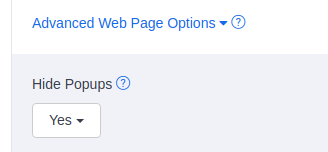
Under Advanced Web Page Options, there is a new option at the top: Hide Popups. Change the option to Yes to turn on the new feature.
How does it work?
If you enable the option, the browser will try to find elements that hide the main content. Here are a few examples.
more...Capture, Review and Archive your Amazon listings
Many users subscribe to Blitapp to monitor their Amazon listings: product page, search results, reviews, special deals, etc.
Amazon tends to make unannounced and unwanted changes to listings. Our users want to quickly see when a change happens and be able to prove what their product page or search results looked like before the change. They the e-mail to quickly spot any changes to their page. The apps (typically Google Drive or Dropbox) keep an archive they can produce anytime.
With Blitapp, you can set up daily captures of all your listings and Amazon pages and receive screenshots directly in your inbox. You can split the captures to contain multiple screenshots — for example, to group the product description, reviews, and search into one e-mail.
You can also set up captures at specific dates — for example, to track limited special offers. Set up an App, like Google Drive or Dropbox, to share screenshots or archive them for years.
more...You can customize the capture e-mails sent by Blit with different templates, as well as a different sender and reply.
From and Reply To
Under Account, there are two fields that you can use to customize the e-mail. The first is the From field. It will change the sender that is displayed in your e-mail client. You can change it to any value. For example, if you use My Company, it will look like this in Gmail:

The second field, Reply To, is the e-mail address used when a user wants to reply to the e-mail. It should be a valid e-mail address.
Choose a template
You can choose between two templates: Default and Minimal. Click on preview to see what the e-mail subject and content will look like for each of them.
more...You can upload screenshots directly to your cloud storage through Apps. The Slack App allows you to receive your captures in a Slack channel.
To start sending captures as Slack notifications, follow these steps:
- Create an App in Slack.
- Create a Slack App in Blitapp.
- Add your new App to any capture.
Create an App in Slack
First, you will need to create an Incoming WebHooks App in Slack.
Click on this link to create a new Slack App. Enter the following information:
- App Name: Choose a custom name, for example, Blitapp.
- Development Slack Workspace: Use the workspace where the App should be active.
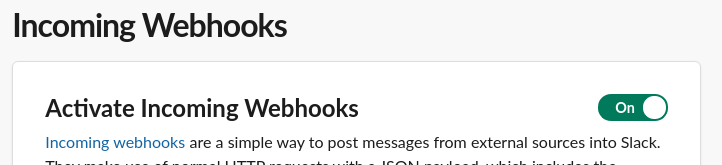
Then, choose Incoming Webhooks. Make sure you Activate Incoming Webhooks.
Blitapp takes all captures in high resolutions, up to 2,000px by 20,000px. Full-page screenshots usually don’t fit on a screen. Therefore, your web browser scales down the image to fit the screen. A full-page capture would look like this in your browser – a small image with a plain black background:
